
How to Assign Pay Rates to Job Titles
Quickly manage employee pay rates by assigning to job titles.
Updated February 19, 2026
To assign pay rates to job titles go to Settings > Company Settings > Manage Job Titles
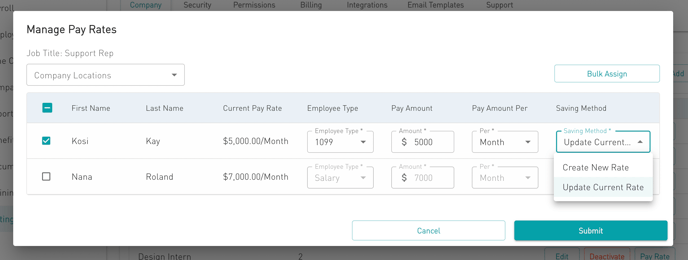
- Select the Pay Rate button for the applicable job title
- Filter employees by company locations
- Select employees to update their pay rate
- To update the current rate, enter the new fields in the table, select Update Current Rate in the Saving Method, then Submit
- To create a new rate, enter the new fields in the table, select Create New Rate in the Saving Method, then Submit
- To update the current rate for all employees assigned to the job title, select Bulk Assign, enter the fields, then Submit
Based on your submission, the pay rates will be updated for the employees assigned to the applicable job title.
Was this article helpful?
Related articles
Still need help?
The Symply support team is here for you. Send us the details and we'll get back to you as soon as we can.